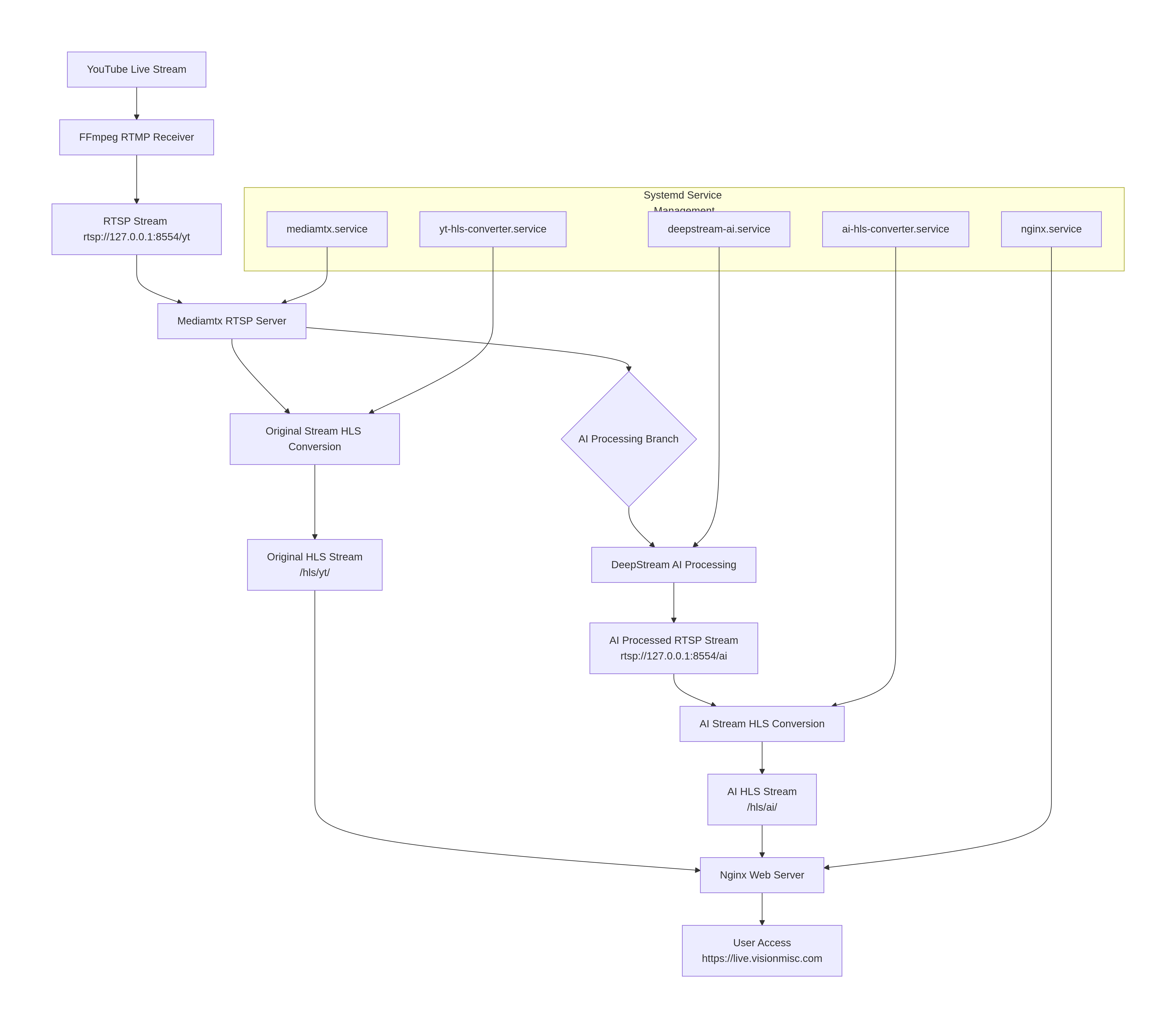
flowchart TD
    A[YouTube Live Stream] --> B[FFmpeg RTMP Receiver]
    B --> C[RTSP Stream rtsp://127.0.0.1:8554/yt]

    C --> D[Mediamtx RTSP Server]

    D --> E[Original Stream HLS Conversion]
    E --> F[Original HLS Stream<br>/hls/yt/]

    D --> G{AI Processing Branch}

    G --> H[DeepStream AI Processing]
    H --> I[AI Processed RTSP Stream<br>rtsp://127.0.0.1:8554/ai]

    I --> J[AI Stream HLS Conversion]
    J --> K[AI HLS Stream<br>/hls/ai/]

    F --> L[Nginx Web Server]
    K --> L

    L --> M[User Access<br>https://live.visionmisc.com]

    subgraph "Systemd Service Management"
        S1[mediamtx.service]
        S2[yt-hls-converter.service]
        S3[deepstream-ai.service]
        S4[ai-hls-converter.service]
        S5[nginx.service]
    end

    S1 --> D
    S2 --> E
    S3 --> H
    S4 --> J
    S5 --> L
➜  system systemctl list-units --type=service --state=active | grep -E "(mediamtx|hls|deepstream|mtx)"

  ai-hls-converter.service           loaded active running AI RTSP to HLS Converter
  deepstream-ai.service              loaded active running DeepStream AI Processing
  mediamtx.service                   loaded active running MediaMTX (RTSP/HLS/WebRTC Media Server)
  youtube-to-mtx@lvision.service     loaded active running YouTube -> MediaMTX RTSP Publisher (yt) for user lvision
  yt-hls-converter.service           loaded active running YouTube RTSP to HLS Converter
➜  system
➜ system cat mediamtx.service [Unit] Description=MediaMTX (RTSP/HLS/WebRTC Media Server) After=network-online.target Wants=network-online.target # Add this line to allow other services to declare dependencies Before=yt-hls-converter.service ai-hls-converter.service deepstream-ai.service
[Service] Type=simple # Add user/group to maintain consistency with other services User=lvision Group=lvision # Add environment variables to ensure correct working environment Environment=PATH=/usr/local/sbin:/usr/local/bin:/usr/sbin:/usr/bin:/sbin:/bin
# Adjust restart policy - keep your choice, but consider stricter restart Restart=on-failure RestartSec=2 # Add startup timeout - mediamtx starts quickly, but just in case TimeoutStartSec=10
➜ system cat yt-hls-converter.service [Unit] Description=YouTube RTSP to HLS Converter After=network.target mediamtx.service Wants=mediamtx.service # If you want to start only after /yt path is ready, you can add: # After=mediamtx.service # BindsTo=mediamtx.service
➜ system cat ai-hls-converter.service [Unit] Description=AI RTSP to HLS Converter # Key Modification 1: Add the dependency of deepstream-ai.service After=deepstream-ai.service mediamtx.service network.target Wants=deepstream-ai.service mediamtx.service # If you want to start only after /ai path is ready, you can add: # After=mediamtx.service # BindsTo=mediamtx.service
# It's possible to use regular expressions by using a tilde as prefix, # for example "~^(test1|test2)$" will match both "test1" and "test2", # for example "~^prefix" will match all paths that start with "prefix". paths: # example: # my_camera: # source: rtsp://my_camera yt: runOnDemand: /usr/local/bin/youtube_to_mtx.sh runOnDemandRestart: yes runOnDemandStartTimeout: 30s runOnDemandCloseAfter: 10s
# Log to stderr (mediamtx will capture) echo"=== YouTube Stream Start $(date) ===" >&2 echo"Source: $YOUTUBE_URL" >&2 echo"Destination: $MTX_RTSP" >&2
# Get best stream URL (filter out warning messages) echo"Fetching stream URL..." >&2 STREAM_URL=$(yt-dlp -f "best[height<=1080]" -g "$YOUTUBE_URL" 2>/dev/null | grep -E "^https?://" | head -1)
if [ -z "$STREAM_URL" ]; then echo"Error: Unable to fetch stream URL" >&2 # Debug: show full output echo"Attempting to fetch stream URL (with debugging):" >&2 yt-dlp -f "best[height<=1080]" -g "$YOUTUBE_URL" >&2 exit 1 fi
echo"Stream URL fetched successfully" >&2 echo"Starting stream to MediaMTX..." >&2
➜ ~ cat /usr/local/bin/rtsp_to_hls_ai.sh #!/usr/bin/env bash set -euo pipefail
# Modification 1: RTSP URL points to AI stream RTSP_URL="rtsp://127.0.0.1:8554/ai" # Modification 2: HLS directory points to ai HLS_DIR="/var/www/live.visionmisc.com/html/hls/ai" HLS_M3U8="${HLS_DIR}/index.m3u8" # Modification 3: log file is now named as AI version LOG_FILE="/home/lvision/logs/rtsp_to_hls_ai.log"
# Simple logging function log() { echo"[$(date '+%Y-%m-%d %H:%M:%S')] $*" | tee -a "${LOG_FILE}" }
log"=== Starting AI RTSP -> HLS Converter ==="
# Clean up old files find "${HLS_DIR}" -name "*.ts" -delete 2>/dev/null || true rm -f "${HLS_M3U8}" 2>/dev/null || true
# Added: Wait for AI RTSP stream to be ready (DeepStream may need time to start) log"Waiting for AI RTSP stream to be ready..." MAX_WAIT=60 for i in $(seq 1 $MAX_WAIT); do iftimeout 2s ffprobe -rtsp_transport tcp "${RTSP_URL}" 2>&1 | grep -q "Stream.*Video"; then log"AI RTSP stream is ready (waited ${i} seconds)" break fi if [ $i -eq $MAX_WAIT ]; then log"Warning: AI RTSP stream not ready within ${MAX_WAIT} seconds, but will continue trying" fi sleep 1 done
# Simple logging function log() { echo"[$(date '+%Y-%m-%d %H:%M:%S')] $*" | tee -a "${LOG_FILE}" }
# Main loop whiletrue; do log"Attempting to connect to AI RTSP stream: $RTSP_URL" log"Starting HLS conversion for AI stream..." if ffmpeg -hide_banner -loglevel warning \ -rtsp_transport tcp \ -i "${RTSP_URL}" \ -an \ -c:v copy \ -f hls \ -hls_time 2 \ -hls_list_size 6 \ -hls_flags delete_segments+append_list \ -hls_segment_filename "${HLS_DIR}/segment_%05d.ts" \ "${HLS_M3U8}" 2>&1 | grep -E "(Stream|Opening|error|failed)" | head -2; then log"AI stream conversion process reported an error" else log"AI stream conversion loop ended or interrupted, preparing to retry..." fi log"Waiting 5 seconds before retrying connection..." sleep 5 done ➜ ~